
انواع Attribute ها در سامانه کورلاگ
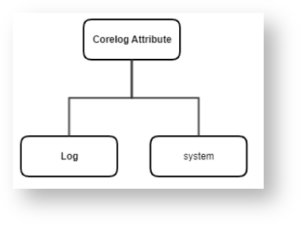
در شکل زیر نمایی از ساختار Attribute ها در سامانه کورلاگ نمایش داده شده است. بطور کلی Attribute های موجود در سامانه ی کورلاگ را می توان به دو دسته کلی تقسیم بندی نمود:
- System: شامل Attribute های Engine سامانه کورلاگ می باشد.
- Log: شامل تمامی Attribute های سنسورهای سامانه کورلاگ می باشد.

System Attribute
Attribute هایی می باشد که به طور خودکار توسط Engine سامانه کورلاگ برای تمامی لاگ ها تعیین می گردند. در واقع به استثناء پارامتر Raw Log، این Attribute ها در لاگ خام وجود ندارند و توسط سامانه کورلاگ به ازای هر لاگ مشخص می شوند.
| Attribute | توضیحات |
|---|---|
Raw Log |
این Attribute لاگ خام دریافت شده را نمایش می دهد. |
Device ID |
این Attribute شناسه Device می باشد که با پارامتر نام دارایی (Asset Name) در CMDB یکی است. همچنین این مقدار مربوط به Device بوده و ارتباطی با سنسورهای نصب شده بر روی آن ندارد. |
|
Reporting IP |
این Attribute یک مقدار Unique است که نشان دهنده نام و IP منبع ارسال کننده لاگ می باشد و به عنوان یک Device در قسمت CMDB سامانه کورلاگ افزوده شده است. |
| Event ID | این Attribute نشان دهنده شماره رکورد لاگ در پایگاه داده سامانه کورلاگ می باشد. |
| Risk | با توجه به فرمول محاسبه Risk در سامانه ی کورلاگ، هر لاگ بر اساس چندین مولفه و شاخص مختلف می تواند دارای ریسکی بین 1 الی 10 باشد. |
| Severity | این Attribute با توجه به PRI موجود در لاگ خام محاسبه می شود و نشان دهنده درجه اهمیت لاگ است. بطور کلی در سامانه کورلاگ Severity دارای مقادیری بین 1 تا 10 می باشد که عدد بزرگتر نشان دهنده اولویت و اهمیت بالاتر است. (برای اطلاعات بیشتر در این خصوص به Calculate Severity in CoreLog مراجعه نمایید.) |
| Event Receive Time | این Attribute زمان دریافت لاگ توسط سامانه کورلاگ را نشان می دهد. |
| Event Receive Minute | این Attribute دقیقه دریافت لاگ را نمایش می دهد و مقدار آن از 0 تا 59 است. |
| Event Receive Hour | این Attribute ساعت دریافت لاگ را نمایش می دهد و مقدار آن از 0 تا 23 است. |
| Event Receive Day | این Attribute روز دریافت لاگ را نمایش می دهد و مقدار آن از 1 تا 31 است. |
| Event Receive Month | این Attribute ماه دریافت لاگ را نمایش می دهد و مقدار آن از 1 تا 12 است. |
| Event Receive Year | این Attribute سال دریافت لاگ را نمایش می دهد. |
Log Attribute
هر لاگ خام شامل پارامترهای مختلفی می باشد که نیاز است Parse شود و در Attribute های مربوطه قرار گیرد.
| Event Source | این Attribute نشان دهنده نوع سنسوری می باشد که از آن لاگ دریافت می گردد. (مانند Windows ،DHCP ،Juniper ،ASA ،DNS و …) |
| Event Type | این Attribute ماهیت لاگ را تعیین می کند. |
| User | این Attribute نشان دهنده نام کاربری می باشد. |
| Source IP | این Attribute با توجه به ماهیت لاگ، آدرس مبدا را نشان می دهد. |
| Dest IP | این Attribute با توجه به ماهیت لاگ، آدرس مقصد را نشان می دهد. |
| Source Port | این Attribute با توجه به ماهیت لاگ، آدرس پورت مبدا را نشان می دهد. |
| Dest Port | این Attribute با توجه به ماهیت لاگ، آدرس پورت مقصد را نشان می دهد. |
| Pre NAT Dest IP | این Attribute آدرس مقصد مربوط به ترافیک را قبل از عملیات NAT، نشان می دهد. |
| Pre NAT Dest Port | این Attribute آدرس پورت مقصد مربوط به ترافیک را قبل از عملیات NAT، نشان می دهد. |
| Post NAT Source IP | این Attribute آدرس مبدا مربوط به ترافیک را بعد از عملیات NAT، نشان می دهد. |
| Post NAT Source Port | این Attribute آدرس پورت مبدا مربوط به ترافیک را بعد از عملیات NAT، نشان می دهد. |
| Target User | در لاگ هایی که به علت ماهیت آن ها دو نام کاربری وجود دارد، Target User برابر نام کاربری می باشد که عملیات بر روی آن انجام شده است و User برابر نام کاربری می باشد که عملیات را انجام داده است. به عنوان مثال در لاگ ایجاد یک حساب کاربری، User برابر است با نام کاربری که اقدام به ایجاد حساب کاربری نموده و Target User برابر با نام حساب کاربری ساخته شده می باشد. باید توجه شود که این Attribute در لاگ های ویندوز دربعضی موارد با علامت $ خاتمه می یابد که نشان دهنده نام کامپیوتر می باشد. همچنین در برخی موارد نظیر لاگین موفق یا ناموفق نام حساب کاربری مربوطه در این پارامتر ثبت می گردد. |
| Command | این Attribute نشان دهنده دستورات اجراشده می باشد. به عنوان مثال در لاگ های مربوط به اعمال پیکربندی بر روی تجهیزات شبکه، مقدار این Attribute نشان دهنده دستوراتی است که بر روی تجهیز مذکور اعمال شده است. همچنین در لاگ های filezilla دستورات ارسال شده از سمت کلاینت به سرور، در این Attribute ثبت می گردد. |
| Policy Name | این Attribute نشان دهنده نام Policy موجود در لاگ می باشد. به عنوان مثال پالیسی مربوط به Permit یا Deny شدن ترافیک در فایروال، در این Attribute ثبت می شود. |
| Virus Action | در لاگ های مربوط به سنسورهای Antivirus، این Attribute نشان دهنده ی رفتار آنتی ویروس در قبال بدافزار شناسایی شده می باشد. به عنوان مثال در سنسور Symantec برخی از مقادیر این Attribute به صورت زیر می باشد: Cleaned ،Quarantined ،Deleted ،Left alone |
| Virus Name | این Attribute نشان دهنده نام ویروس شناسایی شده می باشد. |
| Class Name | عموماً در لاگ های مربوط به شناسایی حملات، دسته بندی مربوط به هر حمله در این Attribute قرار می گیرد. |
| Sub Class Name | ممکن است برخی از Class Name ها خود به چند دسته دیگر تقسیم شوند که به آن ها Sub Class Name گفته می شود و مقادیر مربوطه در این Attribute قرار داده می شود. به عنوان مثال در لاگ های HIPS سنسور Symantec هر Class Name دارای Sub Class Nameهای دیگری نیز می باشد. |
| Intf Name | این Attribute که عموماً در لاگ های مرتبط با تجهیزات شبکه مشاهده می شود، نشان دهنده ی نام Interface ثبت شده می باشد. به عنوان مثال در لاگ های up و down شدن Interface های سوئیچ ها، نام Interface مورد نظر در این Attribute ثبت می گردد. |
| Source Intf Name | این Attribute که عموماً در لاگ های مرتبط با تجهیزات شبکه مشاهده می شود، نشان دهنده ی نام Interface مبدا می باشد. به عنوان مثال زمانی که اینترفیس های ورودی و خروجی ارتباطات در لاگ فایروال ASA ثبت می شود، این Attribute برابر Interface ورودی یا مبدا می باشد. |
| Dest Intf Name | ااین Attribute که عموماً در لاگ های مرتبط با تجهیزات شبکه مشاهده می شود، نشان دهنده ی نام Interface مقصد می باشد. به عنوان مثال زمانی که اینترفیس های ورودی و خروجی ارتباطات در لاگ فایروال ASA ثبت می شود، این Attribute برابر Interface خروجی یا مقصد می باشد. |
| Win Logon Type | در لاگ های Login موفق یا ناموفق مربوط به سیستم عامل ویندوز، کد Logon Type در این Attribute ثبت می شود. برای مشاهده انواع Logon Type ها به این لینک مراجعه شود. (لیست کامل کدهای مذکور در انتهای سند ارائه شده است.) |
| Logon Fail Code | در مراحل Authentication مربوط به سیستم عامل ویندوز (به روش NTLM یا Kerberos) در صورتی که فرآیند Login موفقیت آمیز نباشد، علت آن در این Attribute نمایش داده می شود. برای مشاهده انواع کدهای Logon Failed به این لینک مراجعه شود. (لیست کامل کدهای مذکور که معمولاً در رخدادهای 4625، 4768 و 4771 ثبت می شود در انتهای سند ارائه شده است.) |
| HTTP Status Code | این Attribute در لاگ های مربوط به وب سرورها مشاهده می شود که نشان دهنده وضعیت درخواست های وب می باشد. در واقع HTTP Status Codes و HTTP Substatus Codes در این Attribute ثبت می گردد. (لیست کامل کدهای مذکور در انتهای سند ارائه شده است.) |
| URI Query | این Attribute که عموما در لاگ های مربوط به وب سرورها مشاهده می شود، مربوط به کوئری هایی است که از سمت کلاینت به سرور ارسال می شود. |
| URI Stem | این Attribute که عموما در لاگ های مربوط به وب سرورها مشاهده می شود، مربوط به مسیر دایرکتوری و فایلی است که مرورگر درخواست می دهد. |
| Mail Sender | در لاگ های مربوط به تبادلات Email، از این Attribute برای نمایش آدرس ارسال کننده ی Email استفاده می شود. |
| Mail Receiver | در لاگ های مربوط به تبادلات Email، از این Attribute برای نمایش آدرس دریافت کننده Email استفاده می شود. |
| Received Bytes | این Attribute نشان دهنده ی حجم داده دریافت شده بر حسب بایت می باشد. |
| Sent Bytes | این Attribute نشان دهنده ی حجم داده ی ارسال شده بر حسب بایت می باشد. |
| HTTP Method | این Attribute نشان دهنده ی نوع روش استفاده شده در درخواست های http می باشد. (به عنوان مثال GET، POST، CONNECT، PUT، HEAD، DELETE، OPTIONS، TRACE، PATCH و …) |
| Dest Host Name | در لاگ های ویندوز نام کامپیوتر در این Attribute نمایش داده می شود. همچنین در لاگ های مربوط به query های DNS، که توسط DNS Server ثبت می شوند، دامنه مورد نظر در این Attribute قرار می گیرد. |
| Process Name | این Attribute عموماً در لاگ های ویندوز مشاهده می شود و نشان دهنده نام Process مربوطه می باشد. |
| Process Path | این Attribute عموماً در لاگ های ویندوز مشاهده می شود و نشان دهنده مسیر کامل Process اجرا شده می باشد. |
| CPU Util | این Attribute نشان دهنده میزان CPU Usage می باشد. برای مثال در لاگ های Statistical سنسور FortiGate میزان CPU Usage تجهیز در این Attribute ثبت می گردد. |
Memory Util |
این Attribute نشان دهنده میزان Memory Usage می باشد. برای مثال در لاگ های Statistical سنسور FortiGate میزان Memory Usage تجهیز در این Attribute ثبت می گردد. |
TCP Flags |
این Attribute تعیین کننده TCP Flag های تنظیم شده در بسته های TCP می باشد که عموماً در بعضی از لاگ های فایروال یا Netflow ثبت می شود. |
Threat Category |
این Attribute نشان دهنده دسته بندی تهدیدات می باشد. به عنوان مثال در لاگ های Symantec دسته بندی ویروس شناسایی شده، در این Attribute ثبت می گردد. |
File Name |
به عنوان مثال در لاگ های Symantec مسیر کامل فایل یا برنامه آلوده در این Attribute ثبت می گردد. |
Application Name |
این Attribute نشان دهنده نام Application می باشد. به عنوان مثال در لاگ های Symantec نام فایل یا برنامه آلوده در این Attribute ثبت می گردد. |
Computer |
این Attribute نشان دهنده Computer Name ثبت شده در لاگ می باشد. به عنوان مثال در لاگ های ویندوز، کامپیوتری که لاگ بر روی آن تولید شده از طریق این Attribute شناسایی می شود. |
Domain |
این Attribute نشان دهنده نام دامنه ثبت شده در لاگ می باشد. به عنوان مثال در لاگ های ویندوز، دامنه مربوط به حساب های کاربری در این Attribute نمایش داده می شود. |
Attack Name |
این Attribute نشان دهنده نام حمله ای است که از طریق لاگ های UTM ,IPS و … شناسایی می شود. |
DB Name |
این Attribute نشان دهنده نام Database در لاگ های مربوط به پایگاه داده می باشد. |
Firewall Action |
این Attribute نشان دهنده رفتار Firewall بر اساس قوانین تعیین شده بر روی ترافیک مورد نظر است. |
Firewall Rule |
این Attribute نشان دهنده قانونی است که در فایروال با ترافیک مورد نظر Match شده است. |
SMTP Error Code |
این Attribute نشان دهنده Error Code های پروتکل SMTP برای Mail Server می باشد. (لیست کامل کدهای مذکور در انتهای سند ارائه شده است.) |
Win Logon ID |
این Attribute نشان دهنده شناسه لاگین کاربر می باشد. با توجه به اینکه این شناسه در هر بار راه اندازی سیستم عامل ویندوز برای هر Session منحصر به فرد است، از طریق آن امکان ردیابی فعالیت های کاربر در Session مربوطه امکان پذیر می باشد. |
VM Name |
این Attribute نشان دهنده نام ماشین مجازی می باشد که عموماً در لاگ های VMWare قابل مشاهده است. |
Type |
به عنوان مثال در لاگ های DNS نوع کوئری (A, AAA, SRV, SOA, TXT و …) را نمایش می دهد. |
Transfer type |
در لاگ هایی که از سرور های ویندوزی دریافت می گردد (Active Directory، DNS، DHCP، IIS و…. )، ابزار Agent پارامتری را در ابتدای لاگ ثبت می کند که در پارسر به عنوان recognizer استفاده می گردد. به عنوان مثال در مورد لاگ های DNS این پارامتر برابر MSDNSLog می باشد. |
WLAN SSID |
این Attribute نشان دهنده SSID تجهیزات WLAN می باشد. |
WLAN Channel Id |
این Attribute نشان دهنده شناسه کانال تجهیزات WLAN می باشد. |
Total Packets |
این Attribute نشان دهنده مجموع Packet ها می باشد. |
Total Bytes |
این Attribute نشان دهنده مجموع حجم Packet ها بر اساس بایت می باشد. |
New Status |
به عنوان مثال در لاگ های vCenter در صورت تغییر وضعیت CPU یا Memory ماشین های مجازی، وضعیت جدید (Red/Yellow/Green) در این Attribute ثبت می گردد. |
Original Status |
به عنوان مثال در لاگ های vCenter در صورت تغییر وضعیت CPU یا Memory ماشین های مجازی، وضعیت قبلی (Red/Yellow/Green) در این Attribute ثبت می گردد. |
Task |
این Attribute نشان دهنده نام Task می باشد. به عنوان مثال در لاگ های Task Schedule ویندوز، نام Task مورد نظر در این Attribute ثبت می گردد. |
Target Domain |
در لاگ های سیستم عامل ویندوز، این Attribute دامنه ی مربوط به حساب کاربری Target User را نشان می دهد. |
Software Name |
در لاگ های Symantec این Attribute نشان دهنده نام برنامه ای می باشد که ترافیک آن بلاک شده است. |
Statement |
در لاگ های SQL Server، توضیحات بیشتر در مورد عمل صورت گرفته در فیلد statement (موجود در لاگ خام) ثبت شده که در این Attribute قابل مشاهده است. |
Session Number |
این Attribute نشان دهنده sessionID ثبت شده در لاگ های ESX و IIS می باشد. |
Service Name |
این Attribute نشان دهنده نام سرویس مورد استفاده در لاگ های ویندوز می باشد. |
Sent Packets |
این Attribute نشان دهنده تعداد بسته های ارسالی است که در لاگ بعضی از سنسورها نظیر SRX JunOS ثبت می گردد. |
Sent Bytes |
این Attribute نشان دهنده تعداد بایت های ارسالی است که در لاگ بعضی از سنسورها نظیر IIS و SRX JunOS ثبت می گردد. |
Received Packets |
این Attribute نشان دهنده تعداد بسته های دریافتی است که در لاگ بعضی از سنسورها نظیر SRX JunOS ثبت می گردد. |
Received Bytes |
این Attribute نشان دهنده تعداد بایت های دریافتی است که در لاگ بعضی از سنسورها نظیر IIS و SRX JunOS ثبت می گردد. |
IP Protocol |
این Attribute نشان دهنده Protocol مورد استفاده برای ارتباط می باشد. |
Process ID |
این Attribute نشان دهنده شناسه فرآیند در لاگ ویندوز می باشد. |
Object Name |
در لاگ های مربوط به عملیات صورت گرفته بر روی Object های ویندوز (نظیر file، Folder، کلید های رجیستری و …) نام Object در این Attribute ثبت می گردد. این آیتم در سنسورهای مختلف قابل مشاهده است. |
Object Type |
در لاگ های مربوط به عملیات صورت گرفته بر روی Object های ویندوز، نوع Object ها (نظیر Devices ،Threads ،Events و …) در این Attribute ثبت می گردد. |
Object Action |
در این Attribute عمل صورت گرفته بر روی Object مورد نظر ثبت می گردد. به عنوان مثال در لاگ های مربوط به دسترسی به Object های ویندوز، این Attribute برابر DELETE، WriteData، ReadData، WriteAttributes، ReadAttributes و … می باشد. |
Object Identifier |
شناسه حساب های کاربری یا تسک های زمانبندی شده در لاگ های ویندوز در این Attribute ثبت می گردد. |
Network Access Device IP |
به عنوان مثال در لاگ های Radius و TACACS مربوط به تجهیز ACS، دیوایسی که عمل احراز هویت را درخواست کرده، در این Attribute ثبت می شود. |
Mail Subject |
این Attribute نشان دهنده Subject ایمیل در لاگ های Mail Server (نظیر Exchange Server) می باشد. |
Connection ID |
از این Attribute می توان برای Correlation بین لاگ های مرتبط با یک Session استفاده نمود. به عنوان مثال هنگام ورود موفق کاربر به سیستم های ویندوزی پارامتر Logon ID (موجود در لاگ خام) در این Attribute ثبت شده که تا خاتمه یافتن Session مورد نظر منحصر به فرد است. |
Hardware Fan Status |
به عنوان مثال این Attribute در لاگ های HP Procurve نشان دهنده وضعیت سخت افزاری Fan می باشد. |
HTTP Proto Version |
در لاگ های IIS این Attribute نشان دهنده Version پروتکل HTTP می باشد. |
HTTP User Agent |
یکی از هدرهای مربوط به درخواست های http (از نوع Request header) پارامتر User Agent بوده که شامل سیستم عامل، نوع برنامه، فروشنده و نسخه برنامه درخواست کننده می باشد و در این Attribute ثبت می گردد. |
HTTP Referrer |
این Attribute که معمولاً در لاگ های وب سرور ها مشاهده می شود، آدرس صفحه ارجاع دهنده به صفحه فعلی را نمایش می دهد. |
HTTP Win32 Status |
این Attribute مربوط به خطاهای سیستمی ثبت شده در لاگ های IIS می باشد که به منظور تحلیل آن می توان به لینک System Error Codes مراجعه نمود. |
Host VLAN |
به عنوان مثال در لاگ های Cisco IOS جهت نشان دادن vlan مربوط به host که از چند اینترفیس مشاهده شده است (host is flapping between ports)، از این Attribute استفاده می گردد. |
Host Name |
در صورت ثبت host name در لاگ های مربوط به سنسورهای ESX Server، Windows، Snort، FireSight، Symantec، SRX JunOS، kerio، IIS، Linux و … این Attribute نام host مربوطه را نشان می دهد. |
Host IP |
به عنوان مثال در لاگ های آنتی ویروس Symantec، آدرس host مربوط به سیستم اسکن شده یا سیستمی که بر روی آن ویروس شناسایی شده، در این Attribute ثبت می گردد. |
FTP Status Code |
FTP Status Codes و FTP Substatus Codes وضعیت موفق یا ناموفق بودن درخواست های ftp را تعیین می کنند. همچنین در صورت ناموفق بودن درخواست ها، علت آن را نمایش می دهد. کدهای مذکور در این Attribute ثبت می گردد. (در انتهای سند لیست کامل آن ها ارائه شده است.) |
FTP Method |
این Attribute همان دستورات ارسال شده از سمت کلاینت به سرور در سنسور ftp ویندوز می باشد. |
Win Logon Type
در سیستم عامل ویندوز چندین روش برای Login به یک سیستم وجود دارد که برخی از آنها توسط کاربر و برخی دیگر سیستمی می باشد. انواع مختلف آن در جدول زیر ارائه شده است.
Logon Fail Codes
لیست کامل کدهای Logon Fail که معمولاً در رخدادهای 4625، 4768 و 4771 ثبت می شود، در جدول زیر ارائه شده است.
Logon Fail Codes |
Description |
| 0x0 | No error |
| 0x1 | Client’s entry in KDC database has expired |
| 0x2 | Server’s entry in KDC database has expired |
| 0x3 | Requested Kerberos version number not supported |
| 0x4 | Client’s key encrypted in old master key |
| 0x5 | Server’s key encrypted in old master key |
| 0x6 | Client not found in Kerberos database |
| 0x7 | Server not found in Kerberos database |
| 0x8 | Multiple principal entries in KDC database |
| 0x9 | The client or server has a null key (master key) |
| 0xA | Ticket (TGT) not eligible for postdating |
| 0xB | Requested start time is later than end time |
| 0xC | Requested start time is later than end time |
| 0xD | KDC cannot accommodate requested option |
| 0xE | KDC has no support for encryption type |
| 0xF | KDC has no support for checksum type |
| 0x10 | KDC has no support for PADATA type (pre-authentication data) |
| 0x11 | KDC has no support for transited type |
| 0x12 | Client’s credentials have been revoked |
| 0x13 | Credentials for server have been revoked |
| 0x14 | TGT has been revoked |
| 0x15 | Client not yet valid—try again later |
| 0x16 | Server not yet valid—try again later |
| 0x17 | Password has expired—change password to reset |
| 0x18 | Pre-authentication information was invalid |
| 0x19 | Additional pre-authentication required |
| 0x1A | KDC does not know about the requested server |
| 0x1D | KDC is unavailable |
| 0x1F | Integrity check on decrypted field failed |
| 0x20 | The ticket has expired |
| 0x21 | The ticket is not yet valid |
| 0x22 | The request is a replay |
| 0x23 | The ticket is not for us |
| 0x24 | The ticket and authenticator do not match |
| 0x25 | The clock skew is too great |
| 0x26 | Network address in network layer header doesn’t match address inside ticket |
| 0x27 | Protocol version numbers don’t match (PVNO) |
| 0x28 | Message type is unsupported |
| 0x29 | Message stream modified and checksum didn’t match |
| 0x2A | Message out of order (possible tampering) |
| 0x2C | Specified version of key is not available |
| 0x2D | Service key not available |
| 0x2E | Mutual authentication failed |
| 0x2F | Incorrect message direction |
| 0x30 | Alternative authentication method required |
| 0x31 | Incorrect sequence number in message |
| 0x32 | Inappropriate type of checksum in message (checksum may be unsupported) |
| 0x33 | Desired path is unreachable |
| 0x34 | Too much data |
| 0x3C | Generic error |
| 0x3D | Field is too long for this implementation |
| 0x3E | The client trust failed or is not implemented |
| 0x3F | The KDC server trust failed or could not be verified |
| 0x40 | The signature is invalid |
| 0x41 | A higher encryption level is needed |
| 0x42 | User-to-user authorization is required |
| 0x43 | No TGT was presented or available |
| 0x44 | Incorrect domain or principal |
| 0XC000005E | There are currently no logon servers available to service the logon request. |
| 0xC0000064 | User logon with misspelled or bad user account |
| 0xC000006A | User logon with misspelled or bad password |
| 0XC000006D | This is either due to a bad username or authentication information |
| 0XC000006E | Unknown user name or bad password. |
| 0xC000006F | User logon outside authorized hours |
| 0xC0000070 | User logon from unauthorized workstation |
| 0xC0000071 | User logon with expired password |
| 0xC0000072 | User logon to account disabled by administrator |
| 0XC00000DC | Indicates the Sam Server was in the wrong state to perform the desired operation. |
| 0XC0000133 | Clocks between DC and other computer too far out of sync |
| 0XC000015B | The user has not been granted the requested logon type (aka logon right) at this machine |
| 0XC000018C | The logon request failed because the trust relationship between the primary domain and the trusted domain failed. |
| 0XC0000192 | An attempt was made to logon, but the Netlogon service was not started. |
| 0xC0000193 | User logon with expired account |
| 0XC0000224 | User is required to change password at next logon |
| 0XC0000225 | Evidently a bug in Windows and not a risk |
| 0xC0000234 | User logon with account locked |
| 0XC00002EE | Failure Reason: An Error occurred during Logon |
| 0XC0000413 | Logon Failure: The machine you are logging onto is protected by an authentication firewall. The specified account is not allowed to authenticate to the machine. |
SMTP Error Codes
Error Code های پروتکل SMTP در جدول زیر ارائه شده است.
| SMTP Error Codes | Description |
| 101 | The server is unable to connect |
| 111 | Connection refused or inability to open an SMTP stream |
| 200 | System status message or help reply |
| 214 | A response to the HELP command |
| 220 | The server is ready |
| 221 | The server is closing its transmission channel |
| 250 | Requested mail action okay completed |
| 251 | User not local will forward |
| 252 | Cannot verify the user, but it will try to deliver the message anyway |
| 354 | Start mail input |
| 420 | Timeout connection problem |
| 421 | Service is unavailable due to a connection problem |
| 422 | The recipient’s mailbox has exceeded its storage limit |
| 431 | Not enough space on the disk |
| 432 | Recipient’s incoming mail queue has been stopped |
| 441 | The recipient’s server is not responding |
| 442 | The connection was dropped during the transmission |
| 446 | The maximum hop count was exceeded for the message |
| 447 | Message timed out because of issues concerning the incoming server |
| 449 | Routing error |
| 450 | User’s mailbox is unavailable |
| 451 | Aborted – Local error in processing |
| 452 | Too many emails sent or too many recipients |
| 471 | An error of your mail server |
| 500 | Syntax error |
| 501 | Syntax error in parameters or arguments |
| 503 | Bad sequence of commands, or requires authentication |
| 504 | Command parameter is not implemented |
| 510 | Bad email address |
| 511 | Bad email address |
| 512 | Host server for the recipient’s domain name cannot be found in DNS |
| 513 | Address type is incorrect |
| 523 | Size of your mail exceeds the server limits |
| 530 | Authentication problem |
| 541 | The recipient address rejected your message |
| 550 | Non-existent email address |
| 551 | User not local or invalid address – relay denied |
| 552 | Exceeded storage allocation |
| 553 | Mailbox name invalid |
| 554 | Transaction has failed |
FTP Status Codes
کدهای وضعیت FTP اعداد سه رقمی هستند که نشان دهنده وضعیت درخواست های FTP می باشد. در جدول زیر لیست کدهای مذکور ارائه می گردد.
| FTP Status Codes | Description |
| 110 | Restart marker reply. |
| 120 | Service ready in nnn minutes. |
| 125 | Data connection already open; transfer starting. |
| 150 | File status okay; about to open data connection. |
| 200 | Command okay. |
| 202 | Command not implemented, superfluous at this site. |
| 211 | System status, or system help reply. |
| 212 | Directory status. |
| 213 | File status. |
| 214 | Help message. |
| 215 | NAME system type, where NAME is an official system name from the list in the Assigned Numbers document. |
| 220 | Service ready for new user. |
| 221 | Service closing control connection. Logged out if appropriate. |
| 225 | Data connection open; no transfer in progress. |
| 226 | Closing data connection. Requested file action successful (for example, file transfer or file abort). |
| 227 | Entering Passive Mode (h1,h2,h3,h4,p1,p2). |
| 229 | Extended passive mode entered. |
| 230 | User logged in, proceed. |
| 232 | User logged in, authorized by security data exchange. |
| 234 | Security data exchange complete. |
| 235 | Security data exchange completed successfully. |
| 250 | Requested file action okay, completed. |
| 257 | PATHNAME created. |
| 331 | User name okay, need password. |
| 332 | Need account for login. |
| 334 | Requested security mechanism ok. |
| 335 | Security data is acceptable. More data is required to complete the security data exchange. |
| 336 | Username okay, need password. |
| 350 | Requested file action pending further information. |
| 421 | Service not available, closing control connection. This may be a reply to any command if the service knows it must shut down. |
| 425 | Cannot open data connection. |
| 426 | Connection closed; transfer aborted. |
| 431 | Need some unavailable resource to process security. |
| 450 | Requested file action not taken. File unavailable (e.g., file busy). |
| 451 | Requested action aborted. Local error in processing. |
| 452 | Requested action not taken. Insufficient storage space in system. |
| 500 | Syntax error, command unrecognized. This may include errors such as command line too long. |
| 501 | Syntax error in parameters or arguments. |
| 502 | Command not implemented. |
| 503 | Bad sequence of commands. |
| 504 | Command not implemented for that parameter. |
| 521 | Data connection cannot be opened with this PROT setting. |
| 522 | Server does not support the requested network protocol. |
| 530 | Not logged in. |
| 532 | Need account for storing files. |
| 533 | Command protection level denied for policy reasons. |
| 534 | Request denied for policy reasons. |
| 535 | Failed security check (hash, sequence, and so on). |
| 536 | Requested PROT level not supported by mechanism. |
| 537 | Command protection level not supported by security mechanism. |
| 550 | Requested action not taken. File unavailable (for example, file not found, or no access). |
| 551 | Requested action aborted: Page type unknown. |
| 552 | Requested file action aborted. Exceeded storage allocation (for current directory or dataset). |
| 553 | Requested action not taken. File name not allowed. |
| 631 | Integrity protected reply. |
| 632 | Confidentiality and integrity protected reply. |
| 633 | Confidentiality protected reply. |
HTTP Status-Substatus Codes
در جدول زیر لیست کدهای HTTP Stats و HTTP Substatus ارائه شده است.
| HTTP Status-Sub status Codes | Description |
| 100 | Continue. |
| 101 | Switching protocols. |
| 200 | OK. The client request has succeeded. |
| 201 | Created. |
| 202 | Accepted. |
| 203 | Nonauthoritative information. |
| 204 | No content. |
| 205 | Reset content. |
| 206 | Partial content. |
| 301 | Moved permanently. |
| 302 | Object moved. |
| 304 | Not modified. |
| 307 | Temporary redirect. |
| 400 | Bad request. |
| 400.1 | Invalid Destination Header. |
| 400.2 | Invalid Depth Header. |
| 400.3 | Invalid If Header. |
| 400.4 | Invalid Overwrite Header. |
| 400.5 | Invalid Translate Header. |
| 400.6 | Invalid Request Body. |
| 400.7 | Invalid Content Length. |
| 400.8 | Invalid Timeout. |
| 400.9 | Invalid Lock Token. |
| 400.10 | Invalid XFF header |
| 400.11 | Invalid WebSocket request |
| 401 | Access denied. |
| 401.1 | Logon failed. |
| 401.2 | Logon failed due to server configuration. |
| 401.3 | Unauthorized due to ACL on resource. |
| 401.4 | Authorization failed by filter. |
| 401.5 | Authorization failed by ISAPI/CGI application. |
| 401.501 | Access Denied: Too many requests from the same client IP; Dynamic IP Restriction Concurrent request rate limit reached. |
| 401.502 | Forbidden: Too many requests from the same client IP; Dynamic IP Restriction Maximum request rate limit reached. |
| 401.503 | Access Denied: the IP address is included in the Deny list of IP Restriction |
| 401.504 | Access Denied: the host name is included in the Deny list of IP Restriction |
| 403 | Forbidden. |
| 403.1 | Execute access forbidden. |
| 403.2 | Read access forbidden. |
| 403.3 | Write access forbidden. |
| 403.4 | SSL required. |
| 403.5 | SSL 128 required. |
| 403.6 | IP address rejected. |
| 403.7 | Client certificate required. |
| 403.8 | Site access denied. |
| 403.9 | Forbidden: Too many clients are trying to connect to the web server. |
| 403.10 | Forbidden: web server is configured to deny Execute access. |
| 403.11 | Forbidden: Password has been changed. |
| 403.12 | Mapper denied access. |
| 403.13 | Client certificate revoked. |
| 403.14 | Directory listing denied. |
| 403.15 | Forbidden: Client access licenses have exceeded limits on the web server. |
| 403.16 | Client certificate is untrusted or invalid. |
| 403.17 | Client certificate has expired or is not yet valid. |
| 403.18 | Cannot execute requested URL in the current application pool. |
| 403.19 | Cannot execute CGI applications for the client in this application pool. |
| 403.20 | Forbidden: Passport logon failed. |
| 403.21 | Forbidden: Source access denied. |
| 403.22 | Forbidden: Infinite depth is denied. |
| 403.501 | Forbidden: Too many requests from the same client IP; Dynamic IP Restriction Concurrent request rate limit reached. |
| 403.502 | Forbidden: Too many requests from the same client IP; Dynamic IP Restriction Maximum request rate limit reached. |
| 403.503 | Forbidden: the IP address is included in the Deny list of IP Restriction |
| 403.504 | Forbidden: the host name is included in the Deny list of IP Restriction |
| 404 | Not found. |
| 404.0 | Not found. |
| 404.1 | Site Not Found. |
| 404.2 | ISAPI or CGI restriction. |
| 404.3 | MIME type restriction. |
| 404.4 | No handler configured. |
| 404.5 | Denied by request filtering configuration. |
| 404.6 | Verb denied. |
| 404.7 | File extension denied. |
| 404.8 | Hidden namespace. |
| 404.9 | File attribute hidden. |
| 404.10 | Request header too long. |
| 404.11 | Request contains double escape sequence. |
| 404.12 | Request contains high-bit characters. |
| 404.13 | Content length too large. |
| 404.14 | Request URL too long. |
| 404.15 | Query string too long. |
| 404.16 | DAV request sent to the static file handler. |
| 404.17 | Dynamic content mapped to the static file handler via a wildcard MIME mapping. |
| 404.18 | Querystring sequence denied. |
| 404.19 | Denied by filtering rule. |
| 404.20 | Too Many URL Segments |
| 404.501 | Not Found: Too many requests from the same client IP; Dynamic IP Restriction Concurrent request rate limit reached. |
| 404.502 | Not Found: Too many requests from the same client IP; Dynamic IP Restriction Maximum request rate limit reached. |
| 404.503 | Not Found: the IP address is included in the Deny list of IP Restriction |
| 404.504 | Not Found: the host name is included in the Deny list of IP Restriction |
| 405 | Method Not Allowed. |
| 406 | Client browser does not accept the MIME type of the requested page. |
| 408 | Request timed out. |
| 412 | Precondition failed. |
| 500 | Internal server error. |
| 500.0 | Module or ISAPI error occurred. |
| 500.11 | Application is shutting down on the web server. |
| 500.12 | Application is busy restarting on the web server. |
| 500.13 | Web server is too busy. |
| 500.15 | Direct requests for Global.asax are not allowed. |
| 500.19 | Configuration data is invalid. |
| 500.21 | Module not recognized. |
| 500.22 | An ASP.NET httpModules configuration does not apply in Managed Pipeline mode. |
| 500.23 | An ASP.NET httpHandlers configuration does not apply in Managed Pipeline mode. |
| 500.24 | An ASP.NET impersonation configuration does not apply in Managed Pipeline mode. |
| 500.50 | A rewrite error occurred during RQ_BEGIN_REQUEST notification handling. A configuration or inbound rule execution error occurred. |
| 500.51 | A rewrite error occurred during GL_PRE_BEGIN_REQUEST notification handling. A global configuration or global rule execution error occurred. |
| 500.52 | A rewrite error occurred during RQ_SEND_RESPONSE notification handling. An outbound rule execution occurred. |
| 500.53 | A rewrite error occurred during RQ_RELEASE_REQUEST_STATE notification handling. An outbound rule execution error occurred. The rule is configured to be executed before the output user cache gets updated. |
| 500.100 | Internal ASP error. |
| 501 | Header values specify a configuration that is not implemented. |
| 502 | Web server received an invalid response while acting as a gateway or proxy. |
| 502.1 | CGI application timeout. |
| 502.2 | Bad gateway: Premature Exit. |
| 502.3 | Bad Gateway: Forwarder Connection Error (ARR). |
| 502.4 | Bad Gateway: No Server (ARR). |
| 503 | Service unavailable. |
| 503.0 | Application pool unavailable. |
| 503.2 | Concurrent request limit exceeded. |
| 503.3 | ASP.NET queue full |
| 503.4 | FastCGI queue full |